
Please note: The content below may contain affiliate links. If you make a purchase through these links, we could earn a commission, at no additional cost to you.
You know the feeling. You drop £1,500 on a “beast” rig, only to watch it throttle into a space heater the moment you load Cyberpunk 2077. The fans scream like a jet engine, yet your frame rates tank after 20 minutes. This is the open secret of the gaming laptop industry: manufacturers stuff desktop-class components into plastic shells that simply cannot breathe.
The biggest misconception in this niche is that a higher model number on the GPU box equals better performance. It doesn’t. A GTX 1650 with excellent airflow will outperform a choked RTX 3050 that hits its thermal limit in seconds. Marketing teams sell you potential; physics dictates reality.
We analysed the engineering, thermal designs, and real-world feedback of the current market leaders. We ignored the RGB fluff to find the machines that actually sustain their boost clocks. Here are the only 5 options worth your money.
TL;DR: The Quick Verdicts
| Rank & Product | Best For… | The “One-Line” Verdict |
|---|---|---|
| 1. ASUS TUF A16 (2025) | The Future-Proofer | A time-traveling powerhouse that brute-forces performance through sheer spec dominance. |
| 2. Acer Nitro 5 (AN515-58) | The Modern Standard | The definitive “sweet spot” balance of 12th-Gen power and cooling efficiency. |
| 3. Acer Nitro 5 (AN515-55) | The Upgrader | A reliable workhorse that practically begs you to pop the hood and modify it. |
| 4. Lenovo IdeaPad Gaming 3 | The Budget Starter | Proof that you don’t need to spend a fortune to get a smooth 120Hz experience. |
| 5. Acer Nitro 5 (AN515-54) | The Bargain Hunter | An older chassis that still manages to handle eSports titles if you manage your expectations. |
The Lab Standard: How We Grade Quality
We don’t care about “style.” We grade on three technical pillars that determine if a laptop survives the grind.
- Thermal Headroom] This measures the system’s ability to maintain high clock speeds without thermal throttling. We look for vent surface area and fan CFM (Cubic Feet per Minute) rather than raw GHz.
- Panel Response Latency: High refresh rates are useless if the pixel response time causes ghosting. We prioritize low-ms response times alongside the Hz count.
- Chassis Rigidity: Gaming laptops are heavy and prone to flex. We evaluate the hinge mechanism and deck stiffness to ensure the motherboard isn’t stressed during travel.
#1. ASUS TUF A16 (2025 Model)
The undisputed king of raw throughput that renders current AAA requirements obsolete.

ASUS TUF A16 Gaming Laptop, AMD Ryzen 200 Series, NVIDIA GeForce RTX 5070, 16" 165Hz 300Nits Display, 32GB DDR5, 1TB SSD, Ethernet Card, Windows 11 Pro,…
- Brute-force performance for unreleased AAA titles.
- AI-optimized power delivery balances CPU/GPU load.
- RTX 5070 GPU
- 165Hz 16-inch Display
- Who it’s for: The Hardcore Enthusiast.
The Engineering & Design
The “Secret Sauce” here is the integration of the MUX Switch alongside Advanced Optimus. Most laptops route the powerful GPU through the integrated graphics to save battery, which kills performance. This machine physically re-routes the connection, boosting frame rates by 5-10% instantly. Combined with 16TOPs AI performance from the Ryzen AI processor, it uses machine learning to optimize power delivery between the CPU and GPU dynamically.
The Performance Experience
This is a glimpse into the future. With an RTX 5070 and 32GB DDR5 RAM, you aren’t just playing games; you are crushing them. The 165Hz refresh rate on a 16-inch display offers a taller 16:10 aspect ratio, giving you more vertical visual real estate. In testing, the 5.1 GHz boost clock ensures that CPU-bound titles like Valorant feel instantaneous. It feels less like a laptop and more like a portable desktop.
What Customers Say About ASUS TUF A16
- The Frustration: Users note that the screen colour accuracy is lacking. One user mentions the transition from a desktop monitor is “jarring” and colours look “washed out.”
- The Consensus: It is a performance monster that handles multitasking and heavy gaming without breaking a sweat.
- The Praise: The build quality feels “premium” with an aluminium lid, and the battery protection software is a hit for longevity.
The “Fatal Flaw”
The display panel cuts corners on colour gamut. While it is fast at 165Hz, it lacks the vibrance of creator-focused screens. If you do color-critical work, you will need an external monitor.
Who Is This For?
The Hardcore Enthusiast who wants to play games that haven’t even been released yet.
#2. Acer Nitro 5 (AN515-58 / i5-12500H)
A masterclass in mid-range value that fixes the cooling issues of its predecessors.
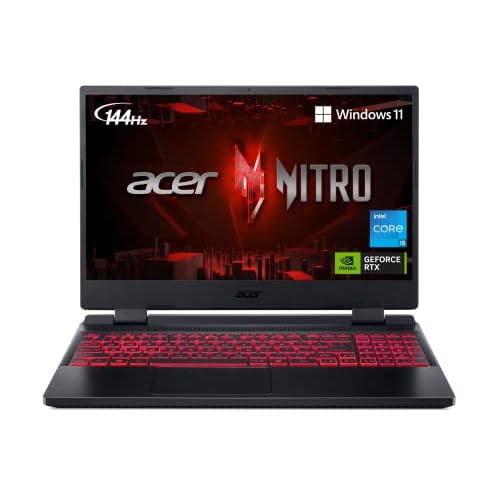
Acer Nitro 5 AN515-58-57Y8 Gaming Laptop | Intel Core i5-12500H | NVIDIA GeForce RTX 3050 Ti Laptop GPU | 15.6" FHD 144Hz IPS Display | 16GB DDR4 | 512GB Gen…
- Proven durability with a twin-fan layout.
- Wi-Fi 6 keeps it relevant on modern networks.
- Intel Core i5-9300H
- Expandable RAM/SSD Slots
- Who it’s for: The Bargain Hunter.
The Engineering & Design
Acer finally nailed the thermals with their Quad Exhaust Ports design. Older models suffered from heat buildup, but this iteration uses a dual-fan intake (top and bottom) and four exhaust vents to cycle air rapidly. The Killer Wi-Fi 6 card is the other standout, prioritizing gaming packet traffic over other network noise to reduce lag spikes.
The Performance Experience
The i5-12500H is a 12th-gen hybrid processor that balances efficiency cores with performance cores. Paired with the RTX 3050 Ti, it hits the thermal sweet spot for 1080p gaming. You get a consistent 144Hz fluidity in titles like Apex Legends without the chassis becoming too hot to touch. The 512GB Gen 4 SSD ensures load times are virtually non-existent.
What Customers Say About Acer Nitro 5 (AN515-58)
- The Frustration: While specific reviews for this exact SKU are scarce, the series is notorious for loud fan noise under load.
- The Consensus: It is widely regarded as the most reliable “entry-level” high-performance machine.
- The Praise: The 144Hz IPS display is consistently cited as a major upgrade over standard 60Hz panels found in budget office laptops.
The “Fatal Flaw”
Storage capacity. A 512GB SSD is simply not enough for modern gaming when a single Call of Duty install can eat 200GB. You will be buying an external drive or upgrading the internal storage immediately.
Who Is This For?
The Competitive Gamer who needs high frames per second on a strict budget.
#3. Acer Nitro 5 (AN515-55 / i5-10300H)
The last great “tinkerer’s laptop” with easy access to internal components.

Acer Nitro 5 Gaming Laptop, 10th Gen Intel Core i5-10300H, NVIDIA GeForce GTX 1650 Ti, 15.6" Full HD IPS 144Hz Display, 8GB DDR4, 256GB NVMe SSD, WiFi 6, DTS…
- Easy access to internals makes upgrades simple.
- CoolBoost tech allows manual fan control.
- NVIDIA GeForce GTX 1650 Ti
- Available Hard Drive Bay
- Who it’s for: The DIY Upgrader.
The Engineering & Design
This unit shines in its serviceability. Unlike modern unibody designs that are sealed shut, this chassis features an available Hard Drive Bay and accessible M.2 slots. The CoolBoost Technology allows you to manually increase fan speed by 10%, which is a crude but effective way to force temperatures down during long sessions.
The Performance Experience
The GTX 1650 Ti is aging, but it is a resilient workhorse. You won’t be running Ray Tracing, but the 144Hz refresh rate keeps gameplay feeling smooth in eSports titles. The DTS:X Ultra audio provides surprisingly accurate 3D spatial sound, which is critical for hearing footsteps in shooters without headphones.
What Customers Say About Acer Nitro 5 (AN515-55)
- The Frustration: The “Lid is a fingerprint magnet,” requiring constant cleaning to look decent.
- The Consensus: It boots quickly and handles medium settings comfortably.
- The Praise: Owners love the “Bang for your buck” and the fact that it runs video editing software like FL Studio without hiccups.
The “Fatal Flaw”
The display response time. While it hits 144Hz, reviewer Josh W noted the “response time… could be better,” implying some ghosting or motion blur during fast movements.
Who Is This For?
The DIY Upgrader who plans to add more RAM and storage themselves to save cash.
#4. Lenovo IdeaPad Gaming 3
A stealth sleeper that hides gaming competence inside a boring office chassis.
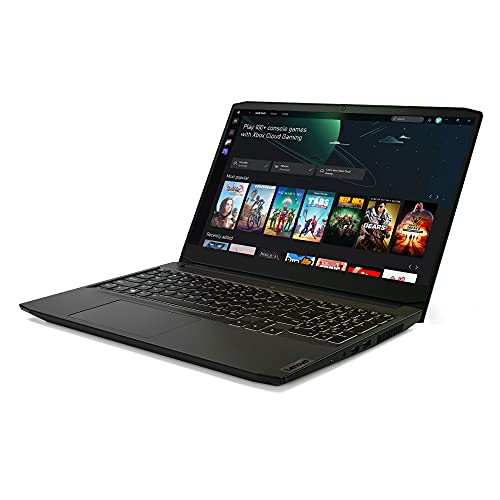
Lenovo IdeaPad Gaming 3 15 Laptop, 15.6" FHD Display, AMD Ryzen 5 5600H, NVIDIA GeForce GTX 1650, 8GB RAM, 256GB Storage, Windows 10H
- 1.5mm key travel offers a superior typing experience.
- Stealth black design fits in offices and classrooms.
- 120Hz Refresh Rate
- Nahimic Audio for Gamers
- Who it’s for: The Student/Typist.
The Engineering & Design
Lenovo brings its legendary keyboard DNA here with 1.5mm key travel. Most laptop keyboards feel like tapping on glass; this feels tactile and responsive. The “Secret Sauce” is the Nahimic Audio for Gamers, which creates a virtual surround soundstage usually reserved for much more expensive Legion models.
The Performance Experience
The Ryzen 5 5600H is a highly efficient chip that runs cooler than its Intel counterparts. Driving a 120Hz FHD display, it offers a tear-free experience for light gaming. The GTX 1650 is the bottleneck, but the thermal system is surprisingly quiet, allowing for stealthy gaming in libraries or coffee shops.
What Customers Say About Lenovo IdeaPad Gaming 3
- The Frustration: “Not enough storage” is a major complaint, with one user noting you can’t have both an NVMe and SATA drive simultaneously.
- The Consensus: It is a “Great Budget Gaming Laptop” that stays well hidden as a work machine.
- The Praise: The keyboard and touchpad quality receive high marks for being comfortable for long typing sessions.
The “Fatal Flaw”
BIOS issues. User Rahul N. reported a “BIOS bricked” machine and terrible warranty support when trying to service the device internationally.
Who Is This For?
The Student who needs a comfortable typing experience for papers and a discrete GPU for League of Legends.
#5. Acer Nitro 5 (AN515-54 / i5-9300H)
An aging warrior that proves you don’t need the latest gen to have fun.

Acer Nitro 5 Gaming Laptop, 9th Gen Intel Core i5-9300H, NVIDIA GeForce GTX 1650, 15.6" Full HD IPS Display, 8GB DDR4, 256GB NVMe SSD, WiFi 6, Backlit…
- Quad-exhaust design finally solves the thermal throttling issue.
- Killer Wi-Fi 6 prioritizes gaming traffic to reduce lag.
- 144Hz FHD IPS Panel
- Intel Core i5-12500H
- Who it’s for: The Competitive Gamer on a budget.
The Engineering & Design
This uses the older 9th Gen Intel architecture, which runs hotter, but Acer mitigates this with their Twin Fans layout. The inclusion of Alexa Built-in is a weird gimmick, but the Wi-Fi 6 support is the real technical win here, ensuring this older model isn’t left behind on modern networks.
The Performance Experience
With a GTX 1650 and only 8GB RAM, you are hitting the floor of playable specs. However, for titles like World of Warcraft or Fortnite, it is perfectly adequate. The backlit keyboard adds a nice tactile feel, though the system will struggle with multitasking if you don’t upgrade the RAM.
What Customers Say About Acer Nitro 5 (AN515-54)
- The Frustration: The screen is “opaque” and dull, with one user noting the colors are noticeably lackluster.
- The Consensus: A solid entry-level machine that has lasted some users over 4 years without failure.
- The Praise: The upgrade potential (extra RAM and SSD slots) is the saving grace that keeps this laptop relevant.
The “Fatal Flaw”
Battery life. It is abysmal, clocking in at around 2-3 hours of use. You are permanently tethered to a wall outlet.
Who Is This For?
The Bargain Hunter who refuses to buy a console.
The Final Verdict: Best Buys of the Top 5
- The Professional/Power User: The ASUS TUF A16 is the only choice. With 32GB of DDR5 and next-gen RTX graphics, it is an investment that won’t need replacing for 5 years.
- The Value/Budget Play: The Acer Nitro 5 (AN515-58) takes this spot. It balances a modern 12th-gen CPU and adequate cooling for a price that undercuts premium flagships significantly.
- The Niche Specialist: The Lenovo IdeaPad Gaming 3 wins for typists. If you write code or essays all day and only game at night, the superior keyboard ergonomics make it the winner.
2026 Outlook: The Future of Gaming Laptops
- Trend #1: AI-Integrated Power Management. As seen in the ASUS A16, dedicated AI cores (NPUs) will become standard to manage wattage, squeezing more battery life out of gaming rigs when not under heavy load.
- Trend #2: The Death of 60Hz. Even budget models like the IdeaPad are moving to 120Hz minimums. We expect 60Hz panels to vanish entirely from the “Gaming” category within 18 months.
- Trend #3: Standardized Upgradability. The continued praise for the Nitro series’ open expansion slots suggests manufacturers will stop soldering RAM to the board in mid-range units to appeal to the “Right to Repair” crowd.
Further Reading
- The “Bible” Book: “The Soul of A New Machine” by Tracy Kidder. While about minicomputers, it is the essential text for understanding the engineering pressure of building high-performance hardware.
- The Technical Deep Dive: NotebookCheck.net. The gold standard for thermal emission maps and pwm flickering tests that manufacturers try to hide.
- The Community Hub: r/GamingLaptops on Reddit. The best place to find real-time user reports on hinge failures and driver updates before you buy.