Turtle Beach VelocityOne Flightdeck HOTAS Joystick & Throttle, Flight Touch Display & OLED HUD (Windows 10/11 PC)
£323.10
Turtle Beach VelocityOne Flightdeck – Universal HOTAS Simulation Joystick and Throttle with Touch Display Stick Mounted HUD and Contactless Sensors for Air and Space Combat on Windows 10 and 11 — USB-connected HOTAS for Windows 10/11 PCs that provides precision flight and space-combat control. Features a detachable stick and throttle, Hall-effect contactless sensors, customizable Flight Touch Display and full-color OLED HUD, and extensive programmable inputs for realistic aircraft and spacecraft simulation control.
Turtle Beach VelocityOne Flightdeck — HOTAS for Windows 10 & 11
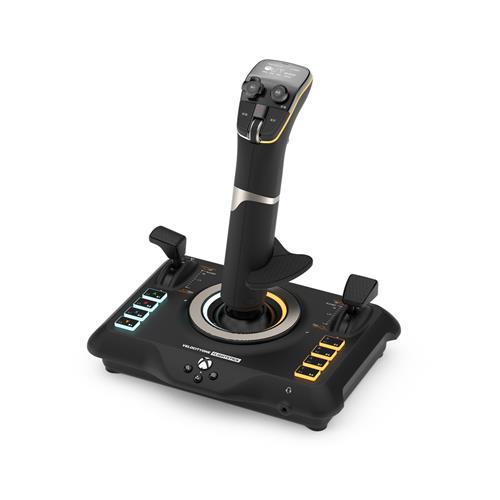
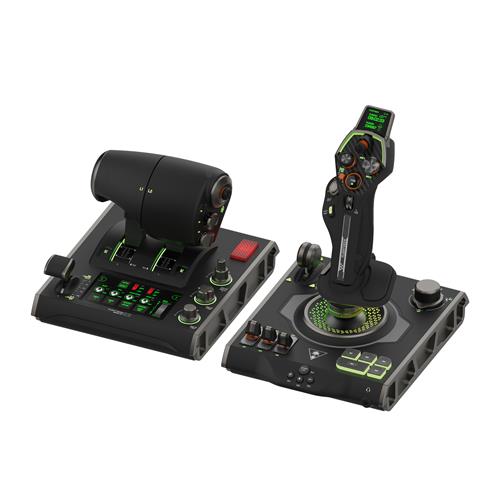
The VelocityOne Flightdeck is a physical HOTAS (hands‑on throttle and stick) peripheral for Windows PCs. It ships as two USB‑connected modules — a stick and a throttle — and includes an on‑device Flight Touch Display and a stick‑mounted full‑colour OLED HUD. Main movement axes use hall‑effect (contactless) sensors for precision and reduced mechanical wear.
It’s aimed at flight and space‑simulation enthusiasts who want a cockpit‑style control set with deep customisation and on‑the‑fly adjustments. Typical users will be sim pilots, streamers and competitive dogfighters who prioritise tactile controls, programmable inputs and the ability to tweak sensitivity or axis response without leaving the sim.
In practical terms the peripheral lets you control aircraft or spacecraft across multiple axes, manage throttle/engine settings, operate weapons and avionics via many programmable buttons, and adjust response curves or rudder lock in real time using the HUD and touch display. The device is designed to support precise flying, targeting and nuanced throttle management rather than introducing new in‑game mechanics itself.
The most important confirmed platform consideration is that the product is described for Windows 10 and Windows 11 only. Support for macOS, Linux or consoles is not established here, and details such as included cables, companion drivers or mounting accessories are not specified — check the manufacturer or retailer for those final pre‑purchase details.
What you get and how it connects
The VelocityOne Flightdeck is a two-piece USB HOTAS system composed of a stick module and a throttle module. It is a physical peripheral intended for Windows 10 and Windows 11 PCs and connects via USB as two individual devices, which gives you more discrete inputs but uses two USB ports. The package is described as including the stick and throttle plus an integrated Flight Touch Display and a stick‑mounted full‑color OLED HUD; exact retail contents such as cables, clamps, screws or printed manuals are not specified in the available product data.
Flight Touch Display and stick-mounted OLED HUD
The Flight Touch Display is a touchscreen that shows real‑time simulator status and provides up to 39 additional configurable button functions and custom on‑device inputs. The stick-mounted OLED HUD gives quick access to diagnostics and on‑the‑fly performance adjustments — examples listed by the manufacturer include axis response curves, rudder lock, lighting adjustment, touchpad response and Turtle Beach audio enhancements for any connected 3.5mm headset. These elements are intended to let you tune sensitivity and behavior without leaving the sim or opening separate software.
Controls, ergonomics and sensors
- Stick module: feature‑rich layout with a soft‑touch hand rest, adjustable height, removable from the base, dual‑stage triggers, head‑mounted HAT switches and multi‑function fire buttons. The stick is listed as providing 49 programmable functions.
- Throttle module: described as a 6th‑gen fighter inspired throttle that can be used for independent two‑engine adjustment or locked together for single‑engine control. It includes multiple dedicated controls on the throttle surface.
- Sensors and performance: all main movement axes on both stick and throttle use hall‑effect (contactless) sensors for increased precision and durability compared with mechanical potentiometers. The product also cites a “Pro‑Aim Focus Mode” to adjust main stick sensitivity for finer targeting or landing control.
- Customization capacity: the overall product listing states a total of 139 programmable buttons/functions across stick, throttle and Flight Touch Display (manufacturer counts). How those are exposed to each game depends on the title’s input mapping.
Compatibility, setup and customization notes
The Flightdeck is marketed for Windows 10 and Windows 11. It supports Turtle Beach audio enhancements for any headset connected via 3.5mm, and the dual‑device USB arrangement can increase available inputs in sims that accept multi‑device HOTAS setups. Practical setup considerations include needing two available USB ports and arranging the modules on your desk or cockpit rig to suit reach and ergonomics.
Important unresolved details you should confirm before purchase: whether dedicated drivers, companion software or firmware updates are required or provided for download; exact included cables, clamps or mounting hardware; support for macOS, Linux or consoles (none confirmed); and warranty/service terms. Game compatibility varies by title — some sims auto‑map HOTAS inputs while others require manual mapping or community profiles — so verify that your preferred sims (e.g., Microsoft Flight Simulator, DCS World, X‑Plane, Elite Dangerous/Star Citizen) expose the axes and buttons you intend to use.
Turtle Beach VelocityOne Flightdeck HOTAS — final pre-purchase checks
Quick checklist of platform, inclusions and compatibility points to confirm before you buy.
- Confirm Windows compatibility — ensure you are buying the Windows 10/11 model and that your PC has the free USB ports required (the system uses two USB-connected modules).
- Drivers, firmware and companion software — ask whether drivers or a configuration/firmware updater are required and where official downloads are provided.
- Exact box contents — verify included cables, clamps or mounting hardware, screws, manuals and whether a 3.5mm audio cable or passthrough accessories are supplied.
- Headset/audio enhancements — confirm how Turtle Beach audio enhancements are delivered (3.5mm passthrough or other) and whether any headset or cable is included or needed separately.
- Mounting and dimensions — request physical dimensions, weight and whether desk clamps or mount accessories are included or must be purchased separately to fit your setup.
- Other platform support — if you need macOS, Linux or console compatibility (Xbox/PlayStation), confirm explicitly — marketing cites Windows only, but third‑party compatibility is not established.
- Warranty and returns — confirm the warranty period, regional support and the retailer’s return policy before purchase.
Prices & Availability
Check and compare current prices and availability from retailers below.