
We’ve all been there. You need a new laptop, but you don’t want to spend a grand. You just need something that works—a machine for browsing, tapping out emails, watching a bit of Netflix, and getting that uni assignment finished. This is the exact market HP is targeting with its Stream 14.
On paper, it’s a tempting offer. For just over £200, you get a slim 14-inch Windows 11 laptop, a sleek blue design, and—the real kicker—a full 12-month subscription to Microsoft 365 Personal included. That’s Word, Excel, PowerPoint, and 1TB of cloud storage sorted for a year.
But here’s the million-dollar (or rather, £200) question: is it a brilliant bargain or a false economy? Is it, as one user puts it, a “fantastic little device for the price,” or is it, as another warns, a “borderline scam”?
We’ve dived deep into the technical specs and, more importantly, the real-world user experiences to find out if this is the budget champion you’ve been waiting for.
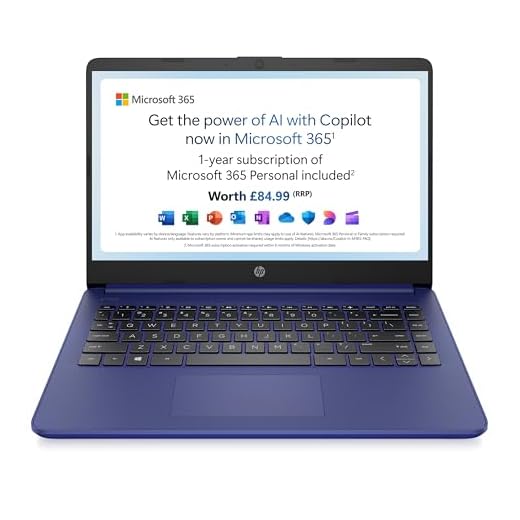
HP Stream 14" Laptop | Intel N4120 Processor | 4 GB RAM | 128 GB SSD | Intel UHD Graphics | HD Display | Dual Speakers | Microsoft 365 Personal 12 month…
Incredible Value Bundle: Includes a full 12-month subscription to Microsoft 365 Personal (Word, Excel, etc.) plus 1TB of OneDrive cloud storage.
Light & Portable: Thin, lightweight design with a long-lasting battery, making it perfect for students, commutes, or carrying around the house.
Windows 11 Ready: Comes pre-installed with Windows 11 for a familiar desktop experience, ideal for basic productivity and web browsing.
Basic Task Performance: Powered by an Intel Celeron N4120 processor and 4GB of RAM, it’s built for everyday tasks like writing, email, and streaming.
Smart Storage: Features a 128GB SSD (faster than eMMC) for the operating system, while the included 1TB of cloud storage handles all your documents and photos.
In Detail: What Does the HP Stream 14 Promise?
The HP Stream 14 is, in essence, HP’s answer to the Chromebook. It’s a lightweight, portability-focused machine built around a budget-friendly Intel Celeron N4120 processor and a modest 4GB of RAM. It’s not designed to be a powerhouse; it’s designed to be enough.
It promises “reliable performance” in a “thin, dependable” package, with a “long-lasting battery life” that should get you through a day of lectures or work. The 6.5mm micro-edge bezel gives it a modern look, and the 128GB SSD on this model is a welcome step up from the painfully small 64GB eMMC storage found on older or cheaper variants.
The main promise is value. You get a complete, ready-to-go package. The included Microsoft 365 subscription alone is worth over £60, which makes the laptop’s “real” price staggeringly low.
But as our synthesis of user feedback reveals, the experience of using the Stream 14 is a tale of two very different outcomes. It all comes down to managing your expectations.
Check the Latest Price on the HP Stream 14 at Amazon.co.uk
Performance: What Can a Celeron N4120 Actually Do?
This is the most critical part of the review, and it’s where user opinions diverge most violently. The laptop runs on an Intel Celeron N4120 processor and 4GB of RAM.
HP’s marketing claims this is “powerful enough for your busiest days” and the “perfect combination of performance, power consumption, and value.”
Let’s be blunt: this is a massive stretch. The Celeron is a basic chip, and 4GB of RAM is the absolute minimum required to run Windows 11.
For many users, this is perfectly fine. One reviewer described it as “fairly nippy” for basic tasks, adding that it “zips along pretty quickly for everyday tasks like web browsing, streaming movies, and working on documents.” Another found it “responsive” and “fast enough” for their needs. The consensus from happy customers is that it “works a treat for programs… that don’t demand too much memory.”
However, if you push it, you hit a wall, hard.
One user, who bought it just for YouTube and Netflix, gave it a one-star review, calling it a “lag fest” that “lags just playing YouTube videos” and “crashes constantly.”
The truth is that this machine is built for single-tasking. Write in Word. Browse the web with a few tabs open. Watch a video. Do one of these things, and it’s fine. Try to do them all at once—with 15 tabs open, Spotify playing, and a spreadsheet in the background—and it will grind to a halt. HP’s claim of it being “powerful enough for your busiest days” is, frankly, misleading.
The Screen and Storage: Living with 128GB
The Stream 14 comes with a 14-inch, 1366 x 768 HD display. This is not Full HD (1080p), so images and text won’t be razor-sharp. It’s an obvious cost-saving measure. On the plus side, it’s an anti-glare screen, which users find “good” and perfectly functional for writing essays or use in a brightly lit room.
More important is the storage. This model has a 128GB SSD. This is a massive improvement on the 64GB eMMC version, which one user rightly warns “soon fills up.” A 128GB SSD is the minimum we’d recommend for any Windows laptop, as the operating system itself takes up a huge chunk.
Even then, be prepared for that drive to fill up. As reviewer Phil Deer noted, 128GB “doesn’t come close to saving all my accumulated photos over the years.”
This is where the included 1TB of OneDrive cloud storage (part of the M365 bundle) becomes essential. You must get into the habit of saving your large files to the cloud, leaving the local SSD for the OS and key applications.
Design, Build, and Battery Life
Here’s where the Stream 14 scores big points. Almost every positive review mentions its design. Users call it “lightweight and compact,” “perfect for carrying around,” and “sleek.”
Crucially, it “doesn’t feel cheap.” One buyer praised its “HP build feel” and “sturdy… textured finish.” This is a huge plus for a device this cheap. It looks and feels like a much more expensive laptop.
Battery life is another standout success. The 41 Wh battery, combined with the low-power Celeron chip, delivers. One user called the battery life “impressive, lasting hours on a single charge,” meaning they “don’t have to stress about finding an outlet during the day.” For a student hopping between lecture halls or a commuter on a train, this is a killer feature.
Ports and Connectivity: The USB-C Conundrum
At first glance, the port selection is decent: two standard USB-A ports, a full-sized HDMI port, a headphone jack, and a modern USB-C port.
But this is where we hit the “serious compromises,” as one reviewer aptly termed it.
That USB-C port is a “dumb” one. It’s for data transfer only. As the review from Phil Deer makes clear, it “doesn’t power the laptop nor does it connect to external monitors.”
This is a huge disappointment. Many users (rightly) expect any modern USB-C port to handle charging and video output. Here, it does neither. You must use the old-school, pin-style “AC smart pin” charger that comes in the box. While some users reported Bluetooth connectivity is a plus, and another outlier noted a “dodgy HDMI port,” the crippled USB-C is the main takeaway.
The “Value” in Value: That Free Year of Microsoft 365
We have to return to this, because it’s central to the Stream 14’s entire proposition. The laptop includes a 12-month Microsoft 365 Personal subscription. As one user (“gib”) put it: “Brilliant. Windows 11, 1 year MS office (about 100 quid).”
This bundle is what elevates the Stream 14 from a “cheap laptop” to a “great value package.” It not only gives you all the essential productivity apps but, as mentioned, the 1TB of OneDrive storage directly solves the laptop’s biggest hardware limitation (the small 128GB SSD).
When you factor in that £60-£70 value, the price of the hardware itself becomes ridiculously low.
The HP Stream 14 vs. The Competition
The document provided doesn’t list any direct competitors, but the Stream 14’s biggest rival is obvious: the Chromebook.


- HP Stream 14: Runs “full” Windows 11. This is its greatest strength and its greatest weakness. It means you can install traditional Windows software (like a specific program for uni) that you can’t on a Chromebook. But Windows 11 is a heavy operating system that struggles on this low-end hardware, leading to the “lag” many users report.
- A Typical Chromebook: For the same price, you can get a Chromebook with the exact same Celeron N4120 processor and 4GB of RAM. Because ChromeOS is an incredibly lightweight, browser-based system, it will feel significantly faster and smoother. Battery life is often even better. The catch? You live entirely in the Google ecosystem (Google Docs, web apps, Android apps). If you need a specific Windows-only program, you’re out of luck.
The verdict here is simple: If you absolutely must have Windows, the Stream 14 is your entry ticket. If all you do is browse the web, write in Google Docs, and watch streaming services, a Chromebook will give you a much snappier experience for the same money.
Our Verdict
So, who is the HP Stream 14 (14s-dq0033sa) for?
This is the perfect laptop for a student, a child, or a home admin user who needs a lightweight, portable Windows machine for basic tasks. It’s for writing essays in Word, managing budgets in Excel, sending emails, and browsing the web.
It is not for gamers, content creators, programmers, or heavy multi-taskers.
To be happy with this purchase, you must follow the advice of user Tymender: “be realistic with your expectations.” This is not a £1000 MacBook Air rival. It is a functional, affordable tool.
The included year of Microsoft 365 is a genuinely brilliant addition, making it an exceptional value package right out of the box. It looks good, feels sturdy, and the battery lasts for ages.
If you understand its very clear limitations, the HP Stream 14 is a “brilliant little machine.” If you try to push it even slightly, you’ll find it a “lag fest.” For the price, and for the right user, it’s a compromise worth making.
Pros and Cons
| Pros | Cons |
|---|---|
| ✅ Excellent value for money | ❌ Slow performance under load |
| ✅ Includes 1-year Microsoft 365 Personal (£60+ value) | ❌ 4GB RAM is a major bottleneck for multitasking |
| ✅ 1TB OneDrive storage (via M365) solves the small SSD | ❌ USB-C port does not support charging or video |
| ✅ Very lightweight, slim, and portable | ❌ HD (1366×768) screen is low resolution |
| ✅ Impressive all-day battery life | ❌ Not suitable for any gaming or demanding software |
| ✅ Stylish design that “doesn’t feel cheap” | ❌ 128GB SSD will fill up fast without cloud storage |
| ✅ Good, sturdy build quality with a textured finish | ❌ Some users report lag even on basic web browsing |
Final Rating: 3.9 / 5
Check the Latest Price on the HP Stream 14 at Amazon.co.uk
Additional Information
- Manufacturer: HP
- Model: HP Stream 14 (14s-dq0033sa)
- Processor: Intel Celeron N4120
- ASIN: B0C6KXTR3N
- First Available: 2 June 2023 (Inferred from URL/ASIN, not explicit)