
In the world of E Ink tablets, you usually face a stark choice: the beautiful, focused simplicity of a device like the Remarkable, or the jack-of-all-trades power of a full Android tablet. The BOOX Tablet Go 10.3 attempts to be the impossible: both. It’s an almost impossibly thin and light 10.3-inch digital notepad, boasting a razor-sharp 300 ppi screen and the full freedom of the Google Play Store.
But it arrives with one, glaring omission that could be a deal-breaker for many: it has no front light. None. Zip.
This review digs into the real-world user experience to find out if the Tablet Go 10.3 is the ultimate distraction-free powerhouse for “paper people,” or a compromised gadget that’s literally left in the dark.

BOOX Tablet Go 10.3 ePaper E Ink Tablet No Front Light 4G 64G 300 PPI B/W
Ultra-Thin & Light Design: Exceptionally portable at just 4.8mm thick and 375g, making it one of the sleekest 10.3-inch E Ink tablets available.
High-Resolution “Paper-Like” Screen: Features a 10.3-inch E Ink Carta 1200 display with a sharp 300 ppi (2480×1860) resolution, designed for clear text and a paper-like reading experience.
Full Android & Google Play Store: Runs on an Android-based OS, allowing for the installation of third-party apps like Kindle, Kobo, Libby, and Pocket, unlike locked-down competitors.
Advanced Note-Taking: Includes a stylus with 4,096 levels of pressure sensitivity, offering a top-tier, low-latency writing experience that users compare directly to the Remarkable 2.
No Front Light: A defining feature is the complete lack of a built-in front light, meaning the device must be used in a well-lit environment, just like real paper.
In Detail: The ‘Live Light, Go Simple’ Promise
On paper, the BOOX Tablet Go 10.3 is a stunner. At just 4.8mm thick and weighing a feather-light 375g, it makes even sleek devices like the iPad Air feel chunky. Its core promise is to be the ultimate digital notebook and e-reader, powered by a capable 2.4Ghz octa-core processor and 4GB of RAM, all running on Android.
This means that, unlike its locked-down competitors, you can (in theory) load up your Kindle, Kobo, Libby, and Pocket apps, side-by-side with a powerful note-taking app. It’s designed for creative minds who want to mark up PDFs, sketch ideas, and read reports on a gorgeous, paper-like screen. But does it deliver?
Get the latest price for the BOOX Tablet Go 10.3 on Amazon UK
Design and Build: Is This the Best-Feeling E Ink Tablet?
Let’s get one thing straight: the hardware here is exceptional. Users are almost unanimous in their praise for the physical device. One reviewer who also owns a Remarkable 2, calls the BOOX Go “absolutely gorgeous,” adding that “it’s a beautiful device to hold and use – the build quality is outstanding.”
This sentiment is echoed by others, praising it as “Super thin and light,” and Amazon’s own summary of reviews notes that “the device is well-built, slim, and receives positive feedback for its elegant design.”
At 375g, it’s significantly lighter than a 10.3-inch Remarkable 2 (403g) or a standard iPad (around 460g). This is a device truly built for holding, and it feels every bit as premium as its £379 price tag suggests.
The Writing Experience: A Remarkable Competitor?
This is the make-or-break feature for a digital notepad, and the BOOX Go delivers. It comes with a BOOX stylus (offering 4,096 levels of pressure sensitivity) and a 10.3-inch HD Carta 1200 glass screen. The result is a writing experience that directly challenges the market leader.
One reviewer puts it best: “The feeling of writing is super important to me… The Remarkable 2 was the best I’d tried so far, but this device equals it.” Another user simply states the “writing feels is brilliant.” For international users, the experience holds up, with one Italian reviewer noting the latency is so low “sembra davvero di scrivere su carta” (it really seems like writing on paper).
It’s not perfect out of the box. The included stylus gets mixed reviews. Some found it “a little ‘scratchy’,” while others said that “while the pen it comes with is okay, I have already bought a couple of other pens,” favouring the Staedtler Noris Digital Jumbo.
So, while the writing feel is top-notch, be prepared that you might want to budget for a new pen to get your perfect setup.
The Screen: The Elephant in the Room
And so we come to the BOOX Go’s defining feature and its greatest weakness: the screen.
It’s a 10.3-inch E Ink Carta 1200 display with a stunning 2480×1860 resolution. At 300 ppi, it’s pin-sharp, making text and comics look fantastic.
But it has no front light.
This decision is, frankly, baffling for a premium device in 2025. It means you can only use it in a well-lit room or in direct sunlight. Forget reading in bed at night unless you have a separate book light, which is exactly what one user (“Lara”) had to do.
This omission is the number one complaint from experienced E Ink users. One user comparing it to a Remarkable 2, says, “The screen on the Go 10.3 was much darker… This made the screen… slightly difficult to read without eye strain in typical UK daylight (indoors).”
User “RS” is even more blunt: “The screen has very poor contrast, black on a grey background. I have a 7 year old Remarkable 1 and the screen is much brighter on this.”
This single design choice fundamentally changes who this tablet is for. If you only work in a bright office or sunny garden, you’ll be fine. For everyone else, the lack of front light could be an issue.
Software: Android Freedom vs. Clunky Controls
The big pro of the BOOX ecosystem is its Android operating system. This is the key reason to buy it over a Remarkable. “I wanted an e Ink device I could have all my eBooks on (Kindle, Kobo and Google books), which I now can as this is an android device.”, reports one user.
The built-in apps for reading and note-taking are also praised. “Anna” found them “so good I don’t feel like installing third party apps,” and “Lara” says the “reading software is very good, with fast navigation and thoughtful options.”
However, this flexibility comes at the cost of simplicity. The freedom of Android brings… well, the clunkiness of Android on an E Ink screen.
“RS” describes the user interface as “clunky and just a mess as though different parts were designed by different people.” This is a common theme. While powerful, it’s not the seamless, simple experience of a Remarkable. Users like “dmco” admit “it is a bit of a learning curve,” and one Italian reviewer noted “la curva di apprendimento… è piuttosto ripida” (the learning curve is rather steep).
Furthermore, third-party app performance can be hit-or-miss. “Anna” found that while the native apps are fast, “drawing on them [3rd party apps] is really slow… it’s like the company has optimized their own apps, and doesn’t care about the third party apps.”
BOOX Tablet Go 10.3 vs. The Competition
This tablet has one clear rival: the Remarkable 2.


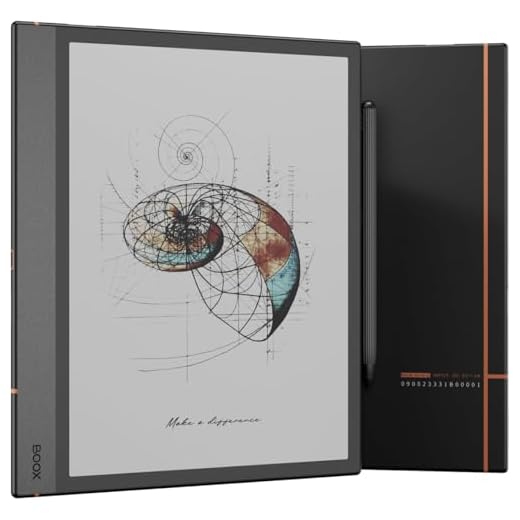
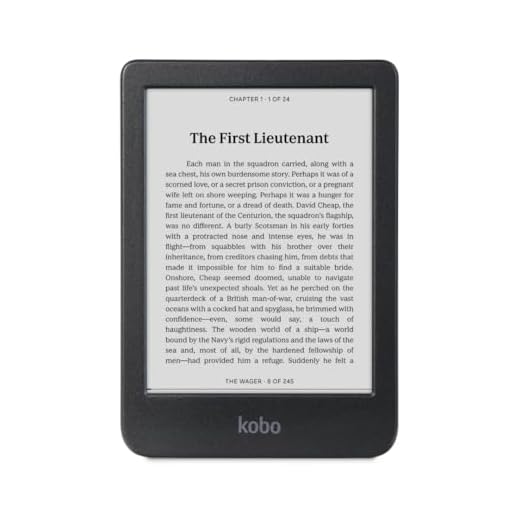
- BOOX Tablet Go 10.3 vs. Remarkable 2: The BOOX Go wins, hands-down, on features. It has a sharper 300 ppi screen (vs. 226 ppi), a faster processor, and the infinite flexibility of the Google Play Store. The writing feel, according to those who have used both, is a dead heat. However, the Remarkable 2 wins on sheer usability and screen comfort. Its screen is brighter and has better contrast (according to user reviews), and its focused, simple software is far less “clunky.”
- vs. other BOOX Tablets (e.g., Note Air series): The Go 10.3 is the ultra-thin minimalist. Other BOOX models, like the Note Air series, are slightly thicker and heavier but include the all-important front light. The Go is for the user who prizes thinness and weight above all else.
Our Verdict
The BOOX Tablet Go 10.3 is a device of frustrating contradictions. It features a best-in-class chassis, “outstanding build quality,” and a “top-notch” writing experience that genuinely rivals the Remarkable 2. Its 300 ppi screen is technically brilliant.
And yet, the decision to omit a front light is a critical, almost arrogant, flaw. It makes the device unusable in many common situations, like a dimly lit living room on a grey British evening.
So, who is this for?
This is for the E Ink purist. The “paper person” (as user O. AK puts it) who craves an Android-powered digital notebook for use only in a brightly lit office or study. If you want a single device for your technical PDFs, Kindle books, and handwritten notes, and you are willing to bring your own lamp, the Tablet Go 10.3 is a stunningly well-made, powerful, and slim companion.
If, however, you read in bed, on a train, or in any less-than-perfect lighting, you should look elsewhere.
Boox Go 10.3 Pros and Cons
Pros
Cons
Final Rating
4.1 / 5
Get the latest price for the BOOX Tablet Go 10.3 on Amazon UK
Additional Information
- Manufacturer: BOOX (Onyx International)
- ASIN: B0D4DFT3W3
- Screen: 10.3″ HD E Ink Carta 1200, 2480×1860 (300 ppi)
- Dimensions & Weight: 4.8mm thick, 375g
- Storage: 4GB RAM + 64GB ROM
- Connectivity: Wi-Fi (2.4/5GHz), Bluetooth 5.0
Further Reading:
- Remarkable.com – The main competitor, the reMarkable 2 paper tablet.
- GoodReader.com– A leading authority on E Ink devices and e-readers.
- Boox – The official manufacturer’s page for the BOOX product line.