
Please note: The content below may contain affiliate links. If you make a purchase through these links, we could earn a commission, at no additional cost to you.
Finding a laptop that truly delivers on all fronts is a challenge. You want a screen that makes movies and photos pop, performance that doesn’t stutter when you’ve got 20 tabs open, and a price that doesn’t make your bank account weep. The ASUS Vivobook 15 OLED (X1505ZA) wades into this crowded market promising exactly that: a high-performance, content-creation-ready machine for a mid-range price.
It packs a formidable 12th-generation Intel Core i5 H-series processor, a generous 16GB of RAM, and a roomy 1TB SSD. But the headline act, the feature plastered all over the name, is that 15.6-inch Full HD OLED screen. ASUS is betting that this “gorgeous” display will be enough to win you over.
But does it deliver? We’ve dug into the manufacturer’s claims and, most importantly, synthesised the real-world experiences of dozens of owners to find out if this Vivobook is the ultimate value-for-money machine or a classic case of cutting the wrong corners.
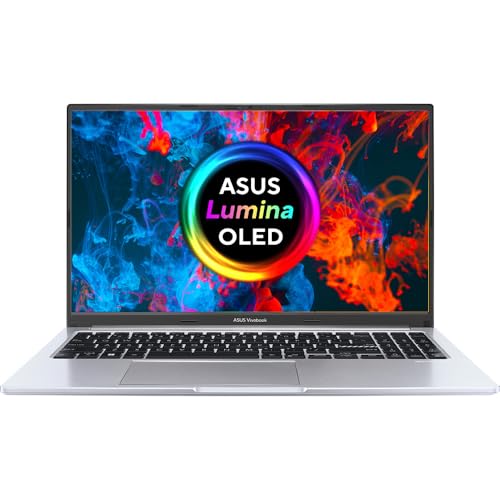
- Powered by Intel’s Core i5-12500H 4.5GHz (12 Cores/16 Thread) 18M Cache
- 15.6″ Full HD OLED 400nits Screen with 600nits Peak Brightness and 100% DCI-P3 Colour Gamut
- 16GB RAM paired with a massive 1TB PCIe SSD for all your storage needs
- ASUS Vivobook 15 complies with US MIL-STD 810H military-grade standard
- UK layout keyboard
The OLED Screen: A ‘Gorgeous’ Main Event?
Let’s start with the star of the show. The 15.6-inch Full HD (1920×1080) OLED panel is, by all accounts, spectacular. ASUS specs it with a 400nits sustained brightness, 600nits peak brightness, and a cinema-grade 100% DCI-P3 colour gamut.
For once, the real-world experience matches the marketing hype. Owners describe the screen as “crystal clear” and “very impressive with bright deep colours”. One user, a photographer, bought it specifically for “photo processing” and was thrilled, noting the display is “great for photographers” and even calibrates to 99% Adobe RGB. If your main priority is a stunning, colour-accurate display for watching films or editing photos, this laptop delivers in a way that’s almost unheard of at its price point.
There is, however, one small catch. A reviewer pointed out that the glossy display is “quite reflective,” which they found “can be disturbing in some environments”. It’s a minor complaint, but something to keep in mind if you often work with a bright window behind you.
Performance: Is the H-Series CPU All It’s Cracked Up To Be?
Inside this machine isn’t your typical, power-sipping laptop chip. It’s an Intel Core i5-12500H. That ‘H’ is important—it signifies a high-performance processor, one with 12 cores and 16 threads, designed for more demanding tasks than just email and spreadsheets. ASUS pairs this with 16GB of fast memory and a 1TB PCIe 3.0 SSD.
The result? It’s “fast”. Owners report a “quick start up time” and confirm the laptop “handles multiple processes like Adobe Photoshop, Cap Cut and multiple… tabs effortlessly”. One user even ran demanding technical software “without lag”.
Impressively, it seems to do this without sounding like a jet engine. One owner noted their “external hard drives are louder in operation than the Asus”. Another described the fan as “quiet” overall, though it “often kicks in with a loud though not too disturbing ‘swoosh'” when playing videos. This strong, relatively quiet performance makes it a powerhouse for students, home office workers, and budding creatives.
The Big Compromises: Battery Life and Touchpad
So, a stunning screen and a powerful processor for a great price. What’s the catch? Unfortunately, there are two big ones, and they both strike at the heart of what makes a laptop, well, a laptop.
Based on customer feedback, this machine has “bad battery life”. That potent H-series processor and vibrant OLED screen are clearly power-hungry. The sentiment is so strong that one reviewer put it perfectly: this is a “decent desktop replacement as long as you are not using it on battery power”. If you need a machine to haul to lectures or work on the train, this is probably not it. Think of it as a slim, portable all-in-one PC that you can easily move from your desk to the kitchen table, as long as the charger comes with it.
The second major issue users report is the touchpad. The AI-generated summary of reviews is blunt, stating the “touchpad…[is] problematic, with multiple customers reporting touchpad issues”. While ASUS claims the touchpad is “bigger… [and] more finger-friendly”, the real-world experience doesn’t seem to back this up. A “problematic” touchpad can make a laptop deeply frustrating to use day-to-day, and it’s a significant flaw.
Design, Build, and… the Missing Keyboard Light
On paper, the build quality should be a strength. ASUS proudly states the Vivobook “complies with US MIL-STD 810H military-grade standard,” suggesting a tough, durable chassis. It also includes some genuinely useful design touches, like a physical webcam shield for “instant privacy” and a 180° lay-flat hinge, which one user loved as it “doesn’t obscure the external monitor”.
However, user experiences on build quality are “mixed”. While some say it “performs well and is well-built,” others report “poor build quality” and, more alarmingly, that it “randomly stops working”.
But the most “frustrating” issue, and one that feels like a baffling oversight, is the keyboard. The product page lists a “UK layout keyboard”. However, one customer, who was otherwise thrilled with the laptop, was shocked to find a missing feature. “Spec says it has an illuminated keyboard but it doesn’t!” This is a deal-breaker for anyone who works in the evenings or in dimly lit rooms.
Connectivity: Good Enough, or Outdated?
The Vivobook 15 appears to have all the ports you’d need. It’s equipped with one USB-C 3.2 Gen 1 port, two USB 3.2 Gen 1 Type-A ports, a legacy USB 2.0 port, an HDMI output, and an audio combo jack.
But again, the real-world experience reveals the specs don’t tell the whole story. One tech-savvy user was disappointed by the “lack of full featured USB-C ports” (meaning no video output or high-speed data) and the fact there’s “no ethernet port”. The biggest letdown? The “HDMI 1.4 port does not allow to connect 4k or high refresh rate external displays with resolutions above 1080p”.
For most people, this is fine. But it means you can’t hook this laptop up to a modern 4K monitor and get a 4K picture. Given the laptop’s creative-friendly screen and processor, this feels like a missed opportunity.
ASUS Vivobook 15 OLED vs. The Competition
So how does the X1505ZA stack up?


- vs. ASUS Vivobook 15 OLED X1505VA: This is the X1505ZA’s direct successor, also listed on the page. The key difference is a jump to a 13th-Gen Intel Core i7-13620H processor. If you’re a power user and your budget can stretch, the X1505VA offers a significant performance boost for your money.
- vs. ASUS Vivobook S OLED S5504VN: This alternative offers a 13th-Gen i5-13500H and, crucially, a dedicated Intel Arc A350M 4GB graphics card. It also boasts a brighter 500nits screen with a super-smooth 120Hz refresh rate. This is the better choice for casual gaming or more intense video work.
- vs. Dell Inspiron 15 3535: This is a key rival from another brand. With the Dell, you’re making a clear trade-off. You lose the “gorgeous” OLED screen, get a less powerful AMD Ryzen 5 7520U processor, and have half the RAM (8GB) and storage (512GB). The Dell is for the user on a strict budget who prioritises simple reliability over the screen and power offered by the ASUS.
Our Verdict
The ASUS Vivobook 15 OLED (X1505ZA) is a laptop of stark, frustrating contrasts.
On the one hand, you get a “crystal clear,” colour-accurate OLED screen that is genuinely “superb” for photo processing and media consumption. You also get a “fast” H-series processor that “effortlessly” handles demanding apps like Photoshop. All of this is wrapped up at a price that users repeatedly call “excellent value for money”.
On the other hand, this is not a truly portable laptop. The “bad battery life” makes it a “decent desktop replacement” at best. This portability issue is compounded by a “problematic” touchpad, the baffling and “frustrating” lack of a backlit keyboard, and outdated ports that hobble its potential as a creative workstation.
Who is this laptop for? This is the perfect machine for a student, home-office worker, or budding photographer who works in one place and keeps their laptop plugged in. If you want a stunning screen and desktop-level power for a bargain price—and you’re willing to accept its flaws—this is a fantastic deal.
If you need to work on the go, type in dimly-lit rooms, or connect to a 4K monitor, you absolutely must look elsewhere.
Pros and Cons
| Pros | Cons |
|---|---|
| ✅ Stunning, “crystal clear” OLED screen | ⚠️ “Bad battery life”; not for portable use |
| ✅ “Excellent value for money” | ⚠️ “Problematic” touchpad with reported issues |
| ✅ Fast i5-12500H processor | ⚠️ No backlit keyboard, despite some specs implying it |
| ✅ “Great for photographers,” 99% Adobe RGB | ⚠️ HDMI 1.4 port doesn’t support 4K displays |
| ✅ Handles demanding apps “effortlessly” | ⚠️ Build quality gets “mixed reviews” |
| ✅ Generally “quiet” operation | ⚠️ “Reflective” glossy screen |
| ✅ Useful 180-degree lay-flat hinge | ⚠️ No Ethernet port |
Final Rating: 4.0/5
Additional Information
- Manufacturer: ASUS
- Model Name: Vivobook 15 OLED (X1505ZA)
- Screen: 15.6 inches
- Colour: Black
- Hard Disk Size: 1 TB
- CPU Model: Core i5 (i5-12500H)
- RAM: 16 GB
- Operating System: Windows 11 Home
Further Reading:
- ASUS Vivobook 15 OLED (X1505) Official Page: See the manufacturer’s complete overview and media reviews for the X1505 series.
- ASUS Vivobook 15 OLED (X1505) Tech Specs: The official, detailed technical specifications for all models in the X1505 family.
- PCWorld: Asus Vivobook Pro 15 OLED Review: A detailed professional review of a similar model from a trusted tech site, focusing on OLED performance.